This site uses cookies.
Some of these cookies are essential to the operation of the site,
while others help to improve your experience by providing insights into how the site is being used.
For more information, please see the ProZ.com privacy policy.
VIA AILooking for an interpreter?
Remoto by ProZ.com connects you with an identity-verified interpreter by video or phone in about 60 seconds — 300+ languages, on demand or booked ahead.
Try Remoto »
Daniel Frisano ইটালি Local time: 08:14 2008 থেকে সদস্য ইংরেজি থেকে ইটালিয়ান + ...
Feb 2, 2018
I'd like to be able to select all the text from the current cursor position to the end of the segment. In MS Word, most web browsers and other CAT tools you can do it with Ctrl+Shift+Down. Can't make it work in Wordfast, much as I try with key shortcut preferences. Any ideas?
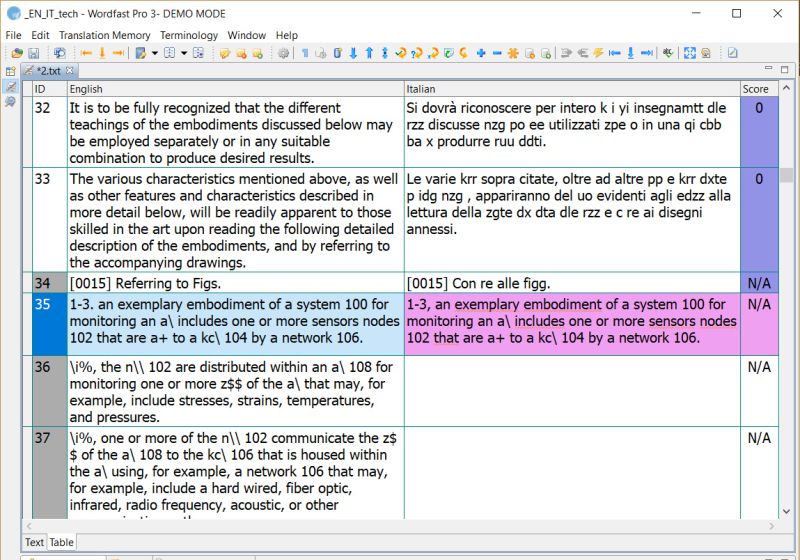
In other words, need a key combination to go from here (with the cursor before "an"):
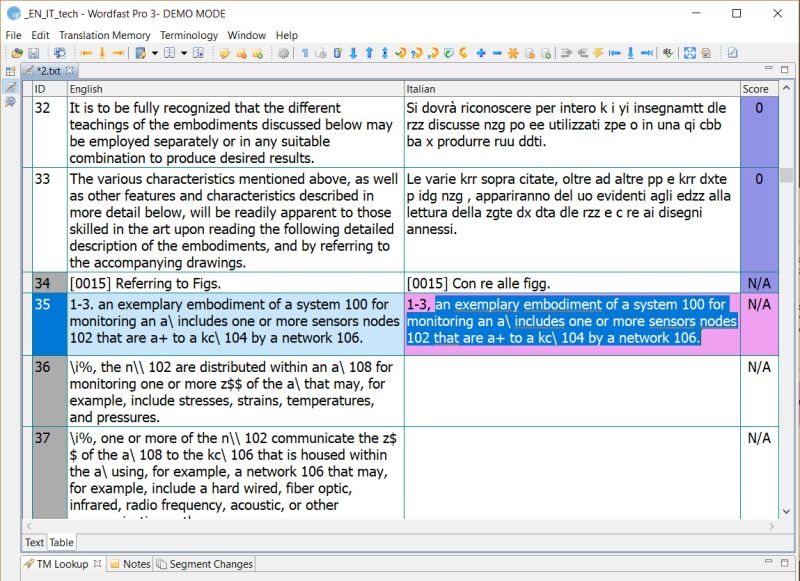
to here:
Subject:
Comment:
The contents of this post will automatically be included in the ticket generated. Please add any additional comments or explanation (optional)
John Di Rico ফ্রান্স Local time: 08:14 ফেঞ্চ/ফরাসি থেকে ইংরেজি + ...
Fn+Shift+right arrow on Mac for WFP5
Feb 2, 2018
Not sure about WFP3 but I suspect you need the right arrow or function key.
Best,
John
Subject:
Comment:
The contents of this post will automatically be included in the ticket generated. Please add any additional comments or explanation (optional)
Daniel Frisano ইটালি Local time: 08:14 2008 থেকে সদস্য ইংরেজি থেকে ইটালিয়ান + ...
TOPIC STARTER
@John
Feb 2, 2018
Yes, Ctrl+Shift+RightArrow does it one word at a time. I need to select the whole text at once, from the cursor to the end of the segment.
Subject:
Comment:
The contents of this post will automatically be included in the ticket generated. Please add any additional comments or explanation (optional)
Terry Richards ফ্রান্স Local time: 08:14 ফেঞ্চ/ফরাসি থেকে ইংরেজি + ...
Have you tried...
Feb 2, 2018
Ctrl-Shift-End?
Subject:
Comment:
The contents of this post will automatically be included in the ticket generated. Please add any additional comments or explanation (optional)
Daniel Frisano ইটালি Local time: 08:14 2008 থেকে সদস্য ইংরেজি থেকে ইটালিয়ান + ...
TOPIC STARTER
@Terry
Feb 2, 2018
Yup, and it works when I plug an external keyboard. My laptop doesn't have an "End" key, guess I'll have to remap some other key into it. Thanks for the tip.
Subject:
Comment:
The contents of this post will automatically be included in the ticket generated. Please add any additional comments or explanation (optional)
John Di Rico ফ্রান্স Local time: 08:14 ফেঞ্চ/ফরাসি থেকে ইংরেজি + ...
Fn key
Feb 2, 2018
Hi Daniel,
The Fn key usually turns the down or right arrow on your keyboard into an end key. Do you have a Fn key?
Subject:
Comment:
The contents of this post will automatically be included in the ticket generated. Please add any additional comments or explanation (optional)
Daniel Frisano ইটালি Local time: 08:14 2008 থেকে সদস্য ইংরেজি থেকে ইটালিয়ান + ...
While fumbling with all those keys I (re)discovered that Shift+DownArrow selects one line down at the time. Not exactly what I sought, but close enough.
Subject:
Comment:
The contents of this post will automatically be included in the ticket generated. Please add any additional comments or explanation (optional)
Edit Translations Faster With Affordable AI You Can Trust
Draftsmith is an affordable AI editing tool for busy translators. It works directly in Microsoft Word, supporting the way you work
ProZ members receive a 20% discount on a single user subscription of Draftsmith.
The leading translation software used by over 270,000 translators.
Designed with your feedback in mind, Trados Studio 2022 delivers an unrivalled, powerful desktop
and cloud solution, empowering you to work in the most efficient and cost-effective way.